
Connect ChatGPT
Add Trillet to ChatGPT as a custom MCP connector and sign in with your Trillet account.
Add Trillet to ChatGPT once, then ask ChatGPT to build and edit your agents in any conversation. You sign in with your Trillet login. You don't need an API key.
ChatGPT gets a smaller set of Trillet tools than Claude and the other clients. Check What ChatGPT can do before you start.
Before you start
- A Trillet account. Sign up or log in at app.trillet.ai.
- A ChatGPT plan that allows custom MCP connectors. OpenAI decides which plans can add custom MCP servers and can change this at any time. At the time of writing, OpenAI's help center lists ChatGPT Business, Enterprise, and Edu, on ChatGPT on the web. Check OpenAI's current guide for your plan.
- ChatGPT on the web. Add the connector at chatgpt.com.
On a Business, Enterprise, or Edu workspace, your ChatGPT admin controls who can add custom MCP connectors. If you don't see the option to add one, see For ChatGPT workspace admins below.
Add the Trillet connector
OpenAI updates the ChatGPT interface often, so labels can differ slightly in your account. The steps below follow OpenAI's current guide to adding a custom MCP server.
In ChatGPT on the web, open Plugins, select the + button, then select Add custom MCP server.
In some accounts this area is called Apps (or Apps & Connectors) in Settings, and you first turn on Developer mode under Advanced settings, then select Create.
Fill in the form:
- Name:
Trillet - Description:
Build and edit my Trillet voice agents(optional) - Server URL:
https://mcp.trillet.ai/mcp - Authentication: OAuth
Leave any client ID and client secret fields empty. ChatGPT registers itself with Trillet automatically.
ChatGPT shows a warning that custom MCP servers are not verified by OpenAI. Select I understand and want to continue, then create the connector.
ChatGPT opens a Trillet sign-in page. Log in with the account you use at app.trillet.ai.
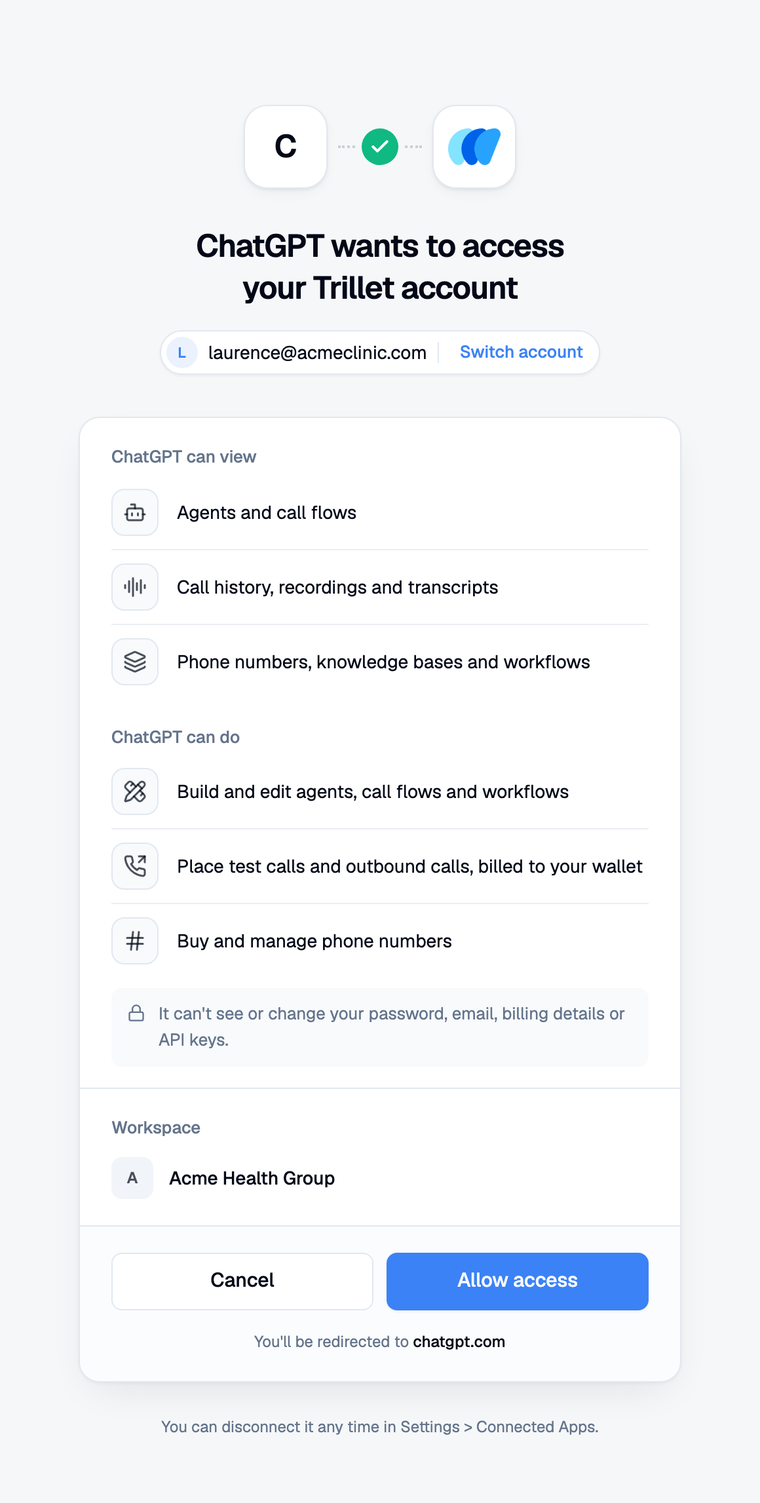
Trillet shows a consent screen titled ChatGPT wants to access your Trillet account. It lists what ChatGPT can view and do, and what it can't reach. See Security and permissions for exactly what a connection can and can't reach.
If you belong to more than one workspace, choose the workspace ChatGPT starts in. ChatGPT can reach all of your workspaces and switches when you ask.
Select Allow access. Trillet returns you to ChatGPT.
What ChatGPT can do
A ChatGPT connection (and an OpenAI Codex connection) gets 24 of Trillet's tools. It gets no prompts or resources.
| Area | Tools |
|---|---|
| Workspaces | trillet_list_workspaces, trillet_switch_workspace |
| Agents and voices | trillet_list_agents, trillet_search_voices, trillet_create_agent, trillet_update_agent |
| Call flows | trillet_list_call_flows, trillet_get_call_flow, trillet_list_drafts, trillet_create_call_flow, trillet_update_prompt, trillet_set_post_call_analysis |
| Call-flow settings | trillet_set_transfers, trillet_set_office_hours, trillet_set_call_settings, trillet_set_speech_settings, trillet_set_welcome_message |
| Knowledge bases | trillet_list_knowledge_bases, trillet_create_knowledge_base, trillet_add_kb_text, trillet_attach_knowledge_bases |
| Demo links | trillet_list_demo_links, trillet_create_demo_link, trillet_set_demo_page_design |
ChatGPT can't:
- Read call history, recordings, or transcripts. Real callers' words can hold health information, so call data stays in the Trillet dashboard.
- Run text test calls or place outbound calls.
- Search, buy, assign, or release phone numbers.
- Create, run, or turn on workflows, or manage secrets.
- Check usage, wallet balance, or transactions.
- Publish drafts or node flows, or delete anything.
- Upload a file to a knowledge base. Add the content as text instead.
Use the Trillet dashboard, or connect Claude or another client, for those.
Two tools work differently in ChatGPT:
trillet_set_call_settingsonly changes how the call runs: silence handling, silence reminders, maximum call length and its closing message, the business time zone, and whether the agent knows the current date and time. Recording, transcript redaction, voicemail detection, and the other call settings stay in the dashboard.trillet_create_demo_linkneeds your explicit approval (confirm: true), and every link has limits. It expires after 14 days by default (at most 90). Each visitor can talk for 5 minutes by default (at most 30), and all visitors together for 60 minutes by default (at most 600). Anyone with the link can talk to your agent, and their minutes are billed to your workspace. To revoke a link, delete it on the call flow's demo links in the Trillet dashboard.
Use Trillet in a chat
- Start a new conversation.
- Type
@in the message box and select Trillet. Depending on your ChatGPT version, you can also select Trillet from the + menu in the message box. - Ask for what you want. For example:
Show me the prompt on my Reception call flow in Trillet and suggest three improvements.
ChatGPT works best when you name Trillet and say what you want done. For more ideas, see What you can ask.
Confirming actions
ChatGPT asks you to approve any tool that changes something, such as updating a prompt or a call flow's settings. Check the details before you approve. You can choose to remember your decision for a tool for the rest of that conversation. A new conversation asks again.
Creating a public demo link also needs an explicit confirm: true from the assistant. ChatGPT is told to set it only after you approve the link in the chat.
For ChatGPT workspace admins
On Business, Enterprise, and Edu workspaces, admins control custom MCP connectors in Workspace settings:
- Business: admins and owners create and publish custom MCP connectors for the workspace. Members connect within the permissions the workspace allows. The relevant permission is Create plugins with MCPs.
- Enterprise and Edu: admins can use role-based access control to let selected members create custom MCP connectors, and can choose who can use each approved connector. Only admins and owners can publish to the workspace. Admins can also turn individual actions on or off.
When an admin publishes a connector, ChatGPT keeps a snapshot of its tools. When Trillet adds new tools, an admin needs to refresh the connector and publish the update before members see them.
OpenAI documents these controls in Admin controls, security, and compliance for plugins and apps.
Disconnect ChatGPT
You can remove access from either side:
- In Trillet: go to Settings > Account > Connected Apps and select Disconnect next to ChatGPT. Access stops straight away.
- In ChatGPT: remove or disconnect the Trillet connector from your plugin or app settings.
See Security and permissions for details.
Next steps
Last updated on